HTML Applications
Build apps with HTML, CSS, and Lua
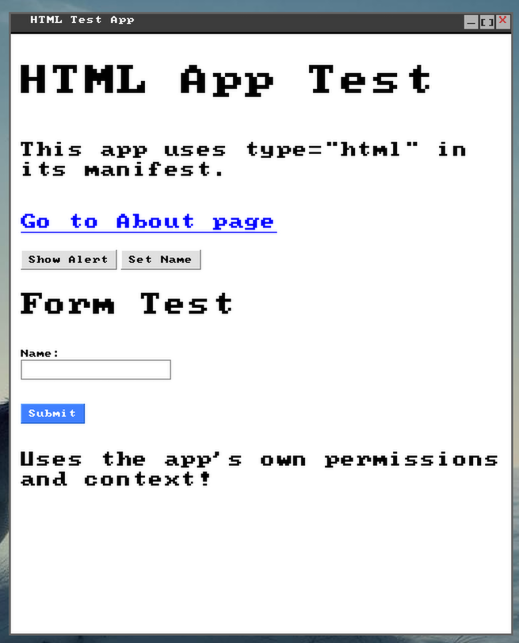
<!DOCTYPE html>
<html>
    <head>
        <title>HTML Test Application</title>
        <meta name="window-width" value="500">
        <meta name="window-height" value="600">
    </head>
    <body>
        <h1>HTML App Test</h1>
        <p>This app uses type="html" in its manifest.</p>

        <p><a href="about.html">Go to About page</a></p>

        <button onclick="alert('Hello from HTML app!')">Show Alert</button>
        <button onclick="setName()">Set Name</button>

        <h2>Form Test</h2>
        <form>
            <label>Name:</label>
            <input type="text" id="name" name="name">
            <br>
            <input type="submit" value="Submit">
        </form>

        <script>
            console.log("HTML Test App loaded!")

            function setName()
                query("#name").value = "Test User"
            end
        </script>
    </body>
</html>
How It Works
LuajitOS includes a built-in HTML renderer that lets you build graphical applications using familiar web technologies. Unlike Electron, there's no embedded browser - the HTML is rendered directly by the OS.
Key Features
Creating an HTML App
Set type = "html" in your manifest and point entry to your HTML file:
return {
    name = "myapp",
    pretty = "My HTML App",
    type = "html",
    entry = "index.html",
    permissions = {"filesystem"}
}
Lua in Scripts
Inside <script> tags, write Lua code directly. Functions are defined using Lua syntax:
<script>
    -- This is Lua, not JavaScript!
    function handleClick()
        local name = query("#name").value
        alert("Hello, " .. name .. "!")
    end

    -- Access the filesystem
    function saveData()
        fs.write("/home/data.txt", "Saved!")
    end
</script>
Window Size
Set the window dimensions using meta tags in your HTML. These override any values in the manifest:
<meta name="window-width" value="500">
<meta name="window-height" value="600">
Available APIs
HTML apps have access to the same sandboxed APIs as regular Lua apps, based on their manifest permissions: